The pill on the worksheet
Build the worksheet for a steel road frame that’s just moved into Frame Order, and you work down the bill: a Reynolds 853 down tube, a top tube, head tube and seat tube to match, a Columbus Futura carbon fork, dropouts, lugs, a length of Sif silver rod for the brazing. Most rows land with a small green tick beside the quantity. A handful land with an amber pill instead: 1 in Concierge →. 2 in Concierge →.
Those pills are links. Click one.
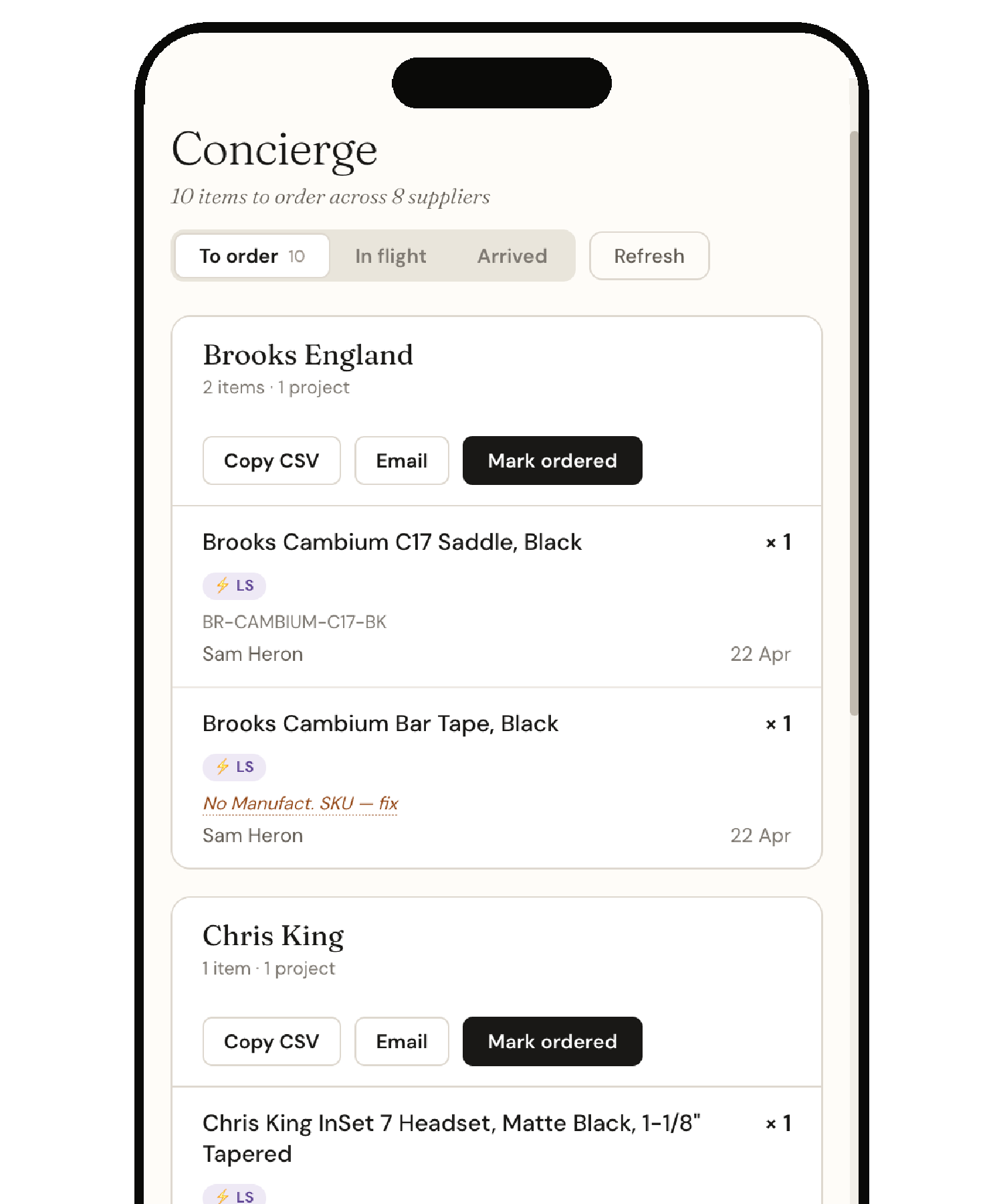
The page that opens is Concierge, and it already knows: the Reynolds tubes are sitting under their supplier group, alongside any other Reynolds parts already short across other builds. The contact email is populated. The CSV is one click away. You haven’t composed anything; Concierge prepared it while you were at the bench.
Below the supplier groups, in a quiet sand-coloured panel, three more rows. While you’re here — items coming up. Down tubes again, short across active builds. The Columbus fork, out today. The silver rod, days of runway left. None of them are pills on the worksheet you came from. They’re Demand recommendations — things that aren’t a problem today but will be soon, based on how fast you’ve been getting through them. Adding them to the same order takes one click each.
Two minutes after typing Reynolds into a worksheet, the week’s ordering is mostly done. No supplier portal, no email, not even a different page to remember — you clicked through, looked once, and the system was ready.
Three surfaces, one current
Three pieces of Vidual conspire to make this work. They look like separate features — The Worksheet, Concierge, and Demand — and on the marketing site they’re listed that way. In practice they are one current.
The Worksheet is the part-by-part manifest of a single build. Each line knows what it needs and what you have. When the two don’t agree, a pill appears beside the line — a green tick when stock covers the quantity, an amber or red N in Concierge when it doesn’t. The pill is a hyperlink. Click it and you arrive in Concierge, on the supplier group that part belongs to, with the shortfall pre-filled.
Concierge is the cross-project ordering cockpit. It gathers shortfalls from every active worksheet across every active project, groups them by supplier, and prepares each supplier’s order — CSV, email draft, mark-as-ordered — ready to commit. We wrote about Concierge in detail in April 2026; the short version is that it removes the half-day of context-switching between supplier portals that small studios spend every Monday.
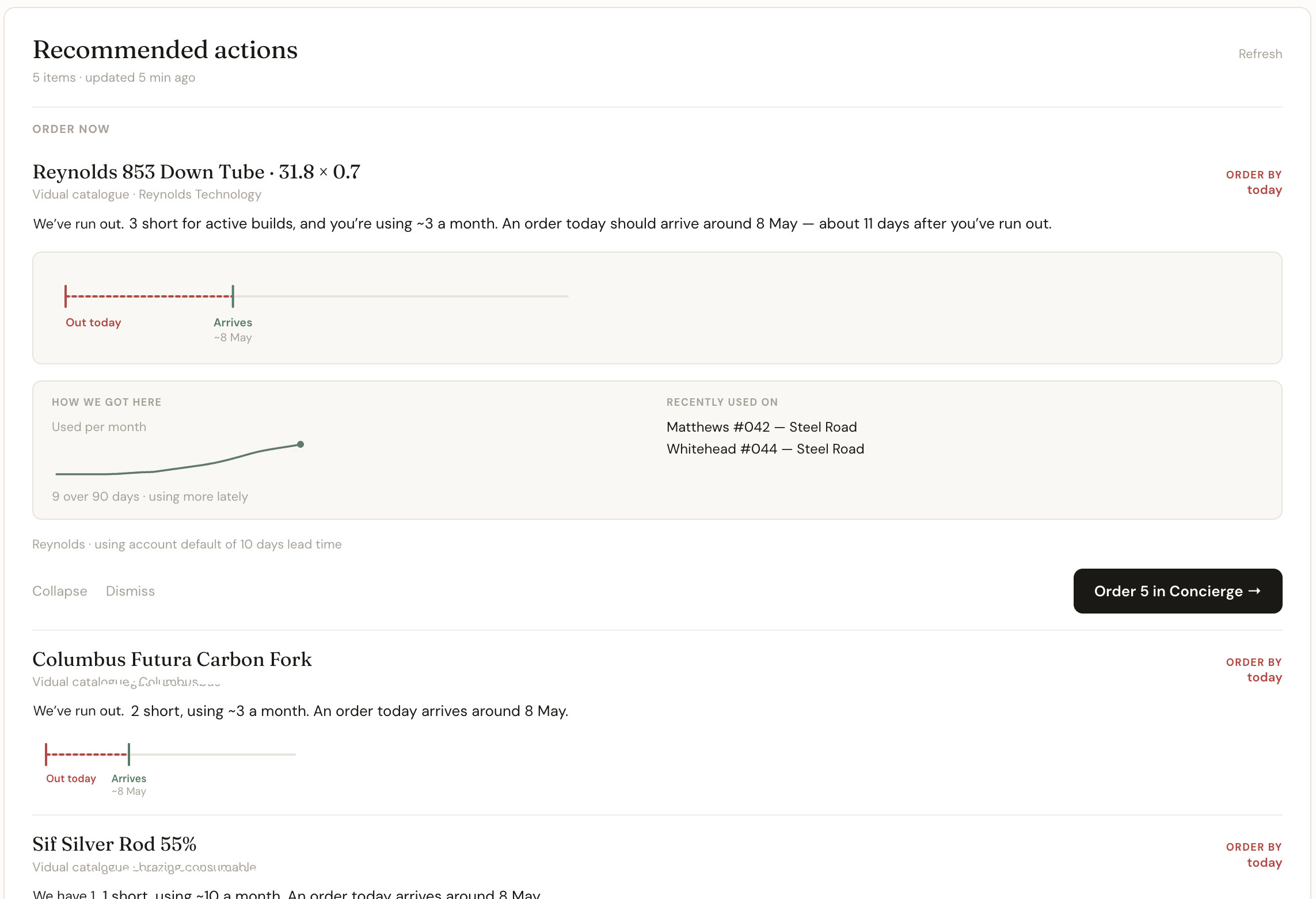
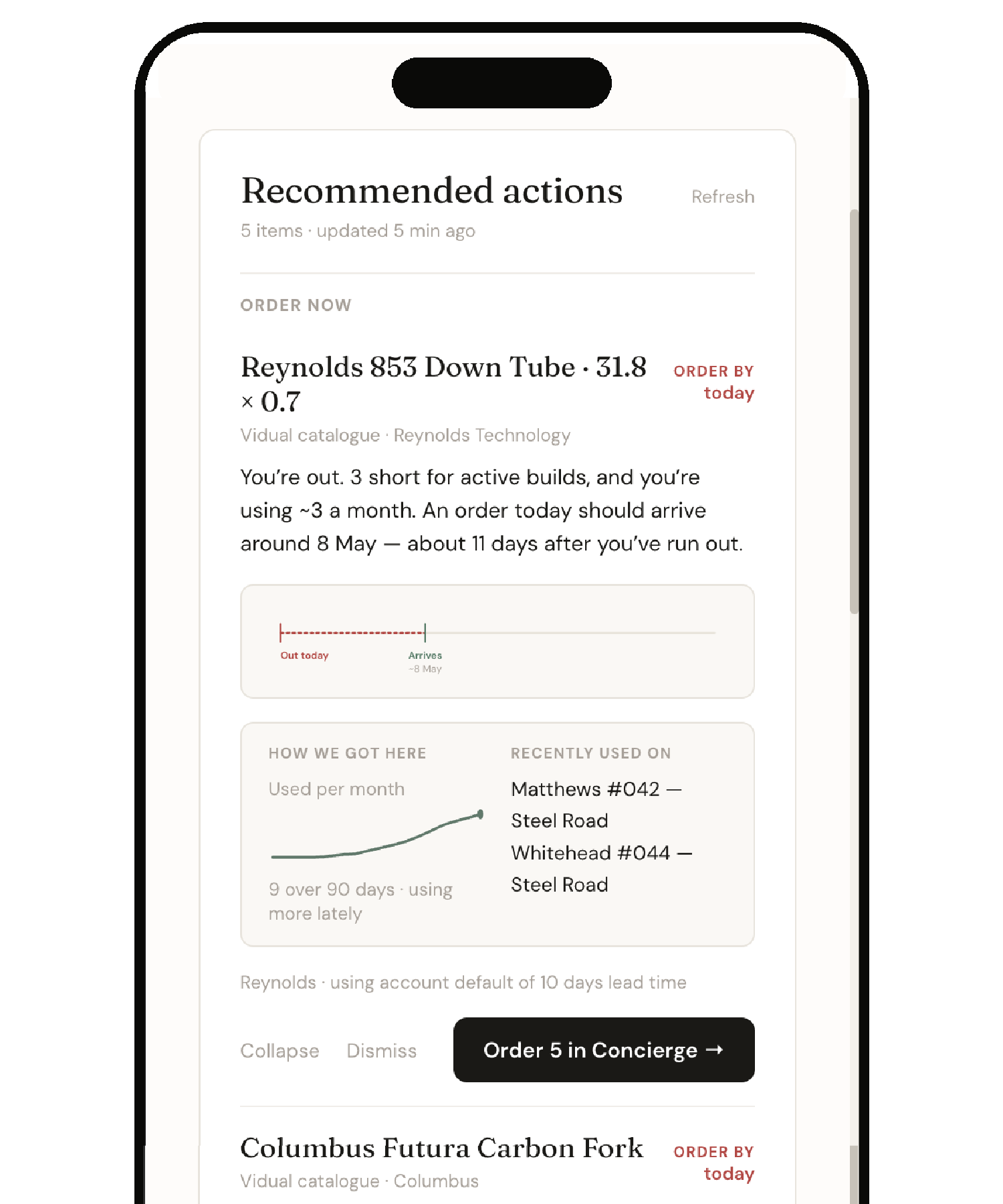
Demand is the look-ahead layer. It reads the same data Concierge reads — ninety days of usage, current stock, what’s already in flight — and tells you what’s about to run short. Not as a chart. Not as a forecast you have to interpret. As a sentence: We’ve run out. 3 short for active builds, and we’re using ~3 a month. An order today should arrive around 8 May — about 11 days after we’ve run out. Each recommendation has a button: Order in Concierge.
The shape of the three together is what the article is about. The worksheet catches the present-tense problem. Concierge prepares the response. Demand notices what’s coming next. Each by itself is useful. The three together is the thing that turned ordering from a Monday-morning chore into a glance.
What the three clicks save
Before this loop existed, the same job looked different. You’d build the worksheet, notice the tubes were short, and make a mental note. You’d open the right supplier portal, log in, search for the part code, work out the right quantity, and decide whether to add anything else while you were there — a decision made from memory. What was running low? When was the silver rod last ordered? Was there a fork request that never got dealt with? The list in your head would come out, gaps and second-guessing included.
Half an hour later the order would be placed, with a quiet uncertainty about whether it covered everything — resolved a week later by the discovery of whatever it missed.
The new loop replaces all of that with three pieces of small clarity:
The worksheet pill is the link. You don’t need to remember to go to Concierge. The pill, sitting in the place where the problem appeared, is the way through to where the problem is solved.
The supplier group already exists. The shortfall is part of a bigger list of things from that same supplier, gathered from every active project. You don’t have to remember which other builds use Reynolds tubes, or Columbus forks, or Sif silver rod. Concierge has done that.
While you’re here. Three items that aren’t short today but will be soon. The system does the recall that used to happen from memory, and does it from data you were already generating without thinking.
None of those three is dramatic on its own. Together, they take a thirty-minute task and make it a two-minute one. They take the second-guessing out of it. And the order is still yours: you read the list, decide what to send and hit send yourself.
The verdict sentence
The Demand recommendations don’t look like forecasting software. They’re written like a colleague at the bench. Three short rules govern every line.
Lead with what you have. We’ve run out. The maker’s first question, answered first — in the same voice a colleague at the bench would use. Then state what’s likely. 3 short for active builds, and we’re using ~3 a month. Plain words rather than runway or velocity or reorder threshold. Then show the consequence of acting. An order today should arrive around 8 May — about 11 days after we’ve run out. Always should, never would — because suppliers are real and lead times are estimates.
Beneath the sentence sits a small horizontal strip with three ticks: today, when you’ll be out, and when an order placed today should arrive. On urgent items there’s a dashed segment between out and arrives — the gap where the workshop is empty. It’s the only visualisation in the recommendation, and it does only one job: it shows you, in the time you spend reading the sentence, whether you’re ordering early enough.
What you don’t see: a chart you have to interpret. A dashboard you have to log into. A planning meeting you have to schedule with yourself. The recommendation is small enough to glance at and dense enough to act on.
Why the maker still presses the button
Demand could, technically, just place the order. The data is there, the supplier and the lead time are known, and the quantity follows from a couple of arithmetic rules. A more aggressive product would simply place the order itself.
Vidual won’t. The same line we hold for Concierge runs through Demand: the system prepares, the maker commits.
Partly this is about correctness — minimum-order rules, credit terms, the small batch you happen to know is already spoken for. Partly it’s about relationships, and partly about trust. The Concierge piece sets out the reasoning in full; none of it is improved by an order going out on its own.
So the “Order in Concierge” button on every recommendation isn’t a hand-off to automation. It’s a hand-off to the maker, with the work prepared. The recommendation has done the noticing and Concierge the gathering, so the supplier list, the quantity, the SKU where we know it and the project context all sit ready. The click, the send and the relationship with the supplier stay yours.
What changes after a few months
What changes after a few months is the surprises. The mid-week discovery of the missing silver rod stops happening, because by the time the silver rod is critical it was already on screen as part of last week’s order. The mid-build run to the supplier becomes rare, because the worksheet caught the shortfall the instant the part was added. The half-day-a-week ordering tax becomes a fifteen-minute glance.
None of this requires learning a new way of working. There are no forecasts to fill in and no reorder points to set; you build BOMs the way you were already building them, record the parts you buy the way you were already recording them, and the loop assembles itself around what you were doing.
The shift, when it lands, is small but durable: you stop being surprised. We’ll take it.
If you’re running more than a handful of builds and you recognise the ordering morning — the half-day spent context-switching between supplier portals and the mid-week discoveries — this loop is already inside Vidual. Open a worksheet, type a part you’re short on, and follow the pill.